
On this page
Auto Coupons
Description
The Auto Coupons module for Magento 2 simplifies the coupon application process for customers by allowing store owners to generate unique URL links for coupon codes. When a customer clicks on the link, the coupon code is automatically applied, eliminating the need for manual entry. This feature is not available in the default Magento 2 functionality.
In situations where a customer is new to the store and the conditions for the coupon discount are not immediately met, the Auto Coupons module displays an "explanation" message that provides details on how to meet the conditions, rather than the general "invalid coupon" message that is shown in default Magento 2.
Furthermore, the module saves the coupon code in the customer's session, so each time they attempt to add a product to their cart, the module automatically applies the same coupon until the conditions are met and the customer sees the default "coupon applied" notification. In default Magento 2, customers must repeatedly enter the coupon code themselves.
The Auto Coupons module also includes two separate redirect URLs for success and failure, which can be used to transfer customers to specific pages when they click the link from their marketing source.
Overall, the Auto Coupon extension simplifies the coupon application process for customers and provides a more user-friendly experience than default Magento 2.
Compatibility
The Auto Coupons module is compatible with the following Magento platforms:
| Community Edition (Open Source) | Enterprise Edition (Commerce) | Cloud Edition |
|---|---|---|
| 2.3.0 - 2.4.* | 2.3.0 - 2.4.* | 2.3.0 - 2.4.* |
Installation
Installing module using zip file
- Unzip and paste the extension file into your root Magento folder.
- Connect to your server by SSH.
- Go to your Magento root folder.
- To install the extension, perform this command:
php bin/magento setup:upgrade
php bin/magento setup:di:compile
php bin/magento setup:static-content:deploy
Composer installation
If this is your first time installing an Aitoc module, in that case, first, you will need to add your Aitoc composer repository. Please review the document to see how you can add the composer repository.
To install the module, you will need to run the following commands:
composer require aitoc/module-auto-coupons
php bin/magento setup:upgrade
php bin/magento setup:di:compile
php bin/magento setup:static-content:deploy -f- To switch the extension on/off, perform these commands:
php bin/magento module:enable Aitoc_AutoCoupons
php bin/magento module:disable Aitoc_AutoCoupons- To update the module, use below command:
composer update aitoc/module-auto-couponsGeneral Switch
Once the module is installed, go to Admin → Stores → Configuration → AITOC EXTENSIONS → AutoCoupons:
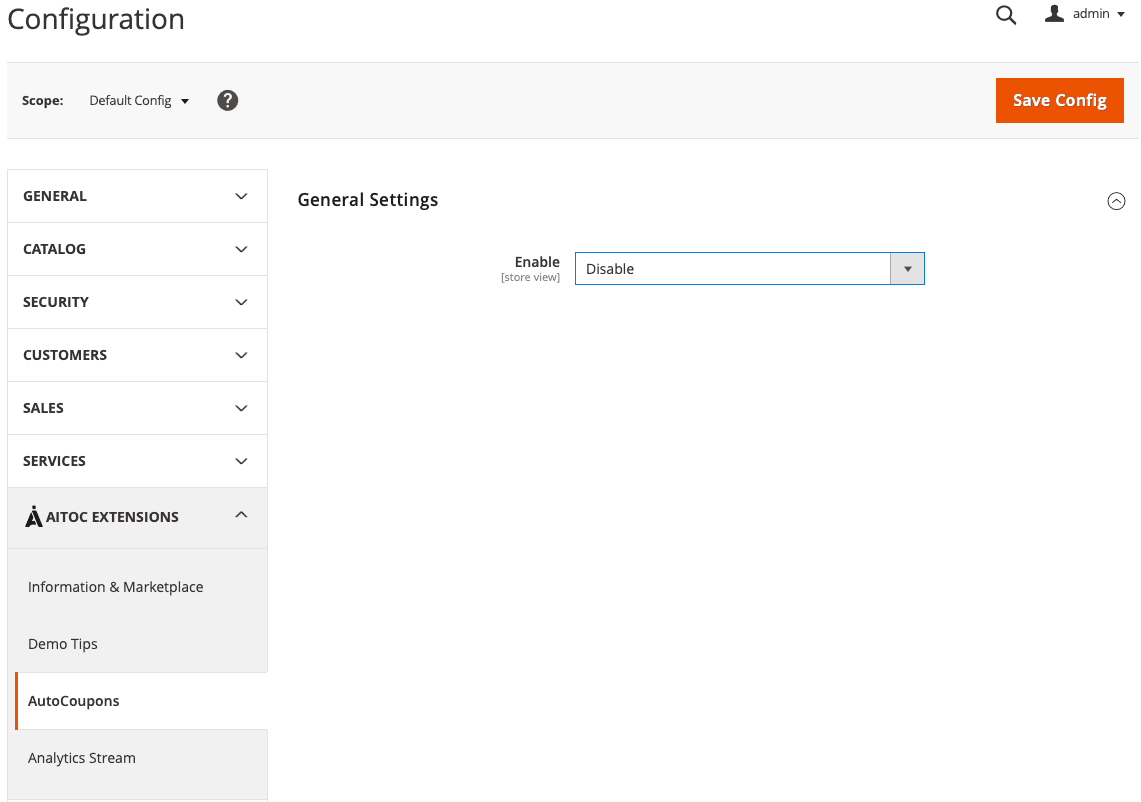
From here, the extension can be managed (enabled or disabled). Note that the scope of this configuration is Store View so it's possible to disable this on some peculiar Store Views only.
Cart Price Rules
The AutoCoupon module extends the default Magento's Cart Price rule functionality. So first of all please check Magento's Cart Price Rules guide to learn how the rule works.
To use the module, one needs to have the Cart Price rule created beforehand. To do that, please go to Marketing → Promotions → Cart Price Rules
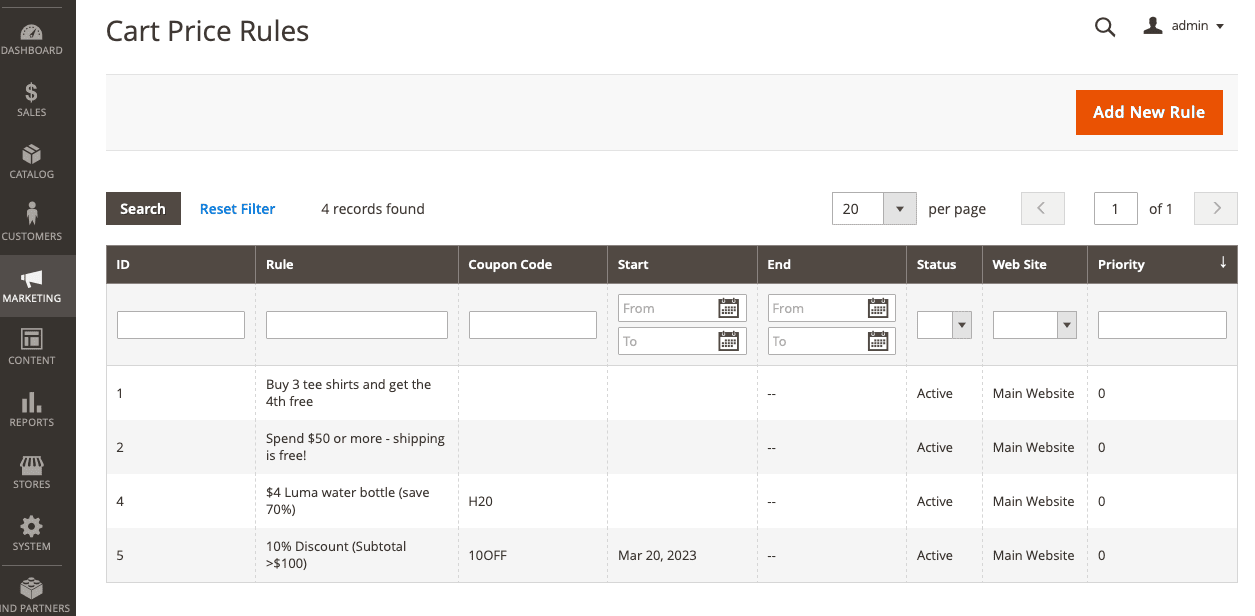
You need either to click the Add New Rule button or edit any existing one.
Let's assume we have the coupon code in the rule:
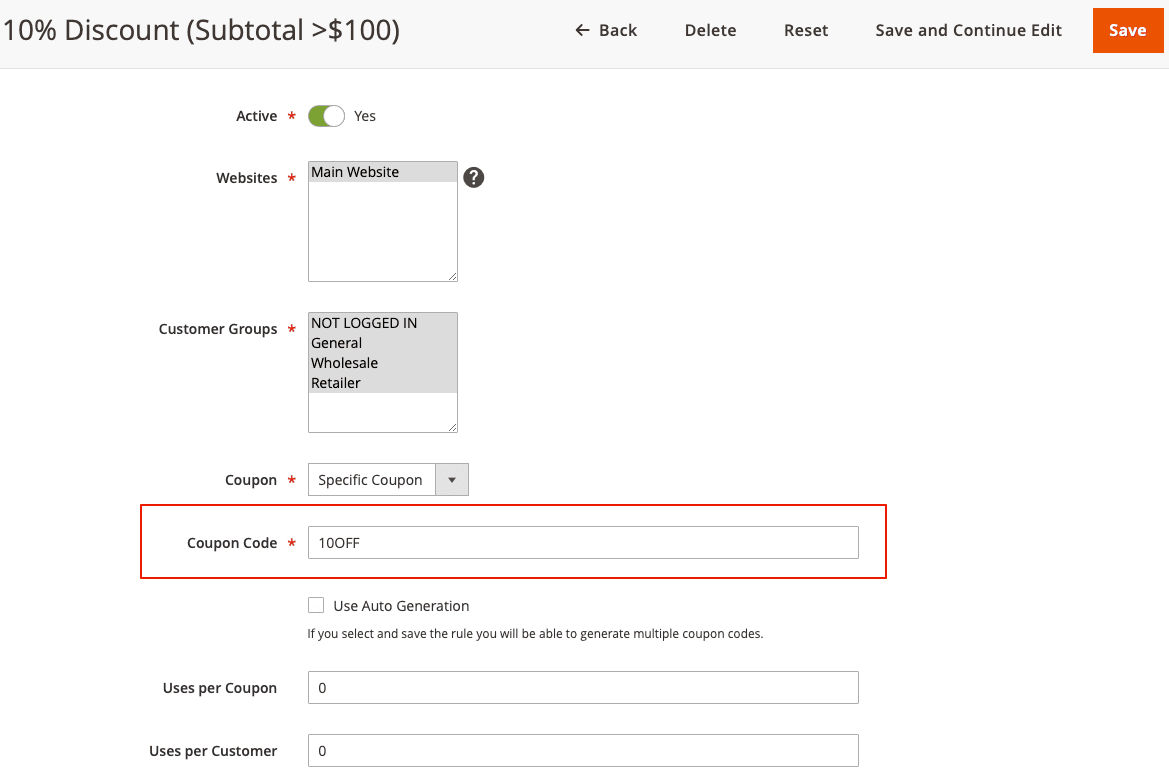
This will automatically create the special URL: https://www.yoursite.com/aitcode/index/index/id/10OFF.
SEO-friendly URL
If you wish, for your marketing campaigns, you may use the Custom Rewrite for the SEO-friendly URLs.
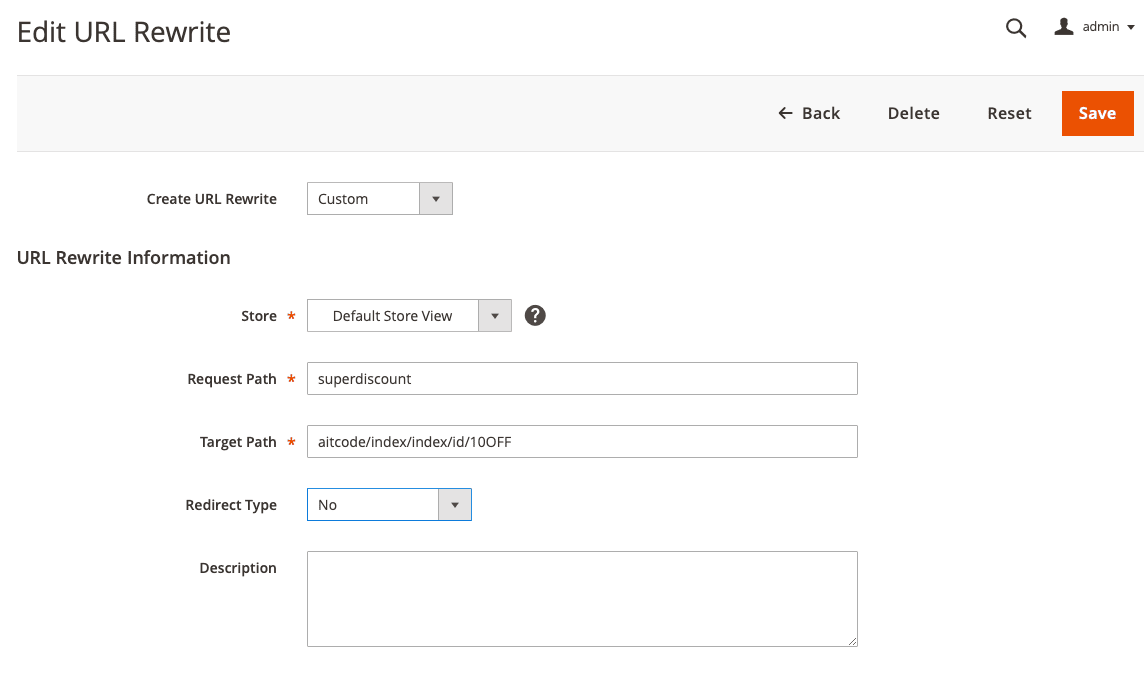
https://www.yoursite.com/superdiscount instead of the "technical one" from above.
To set up the module, please go to the new Auto Coupons section below:
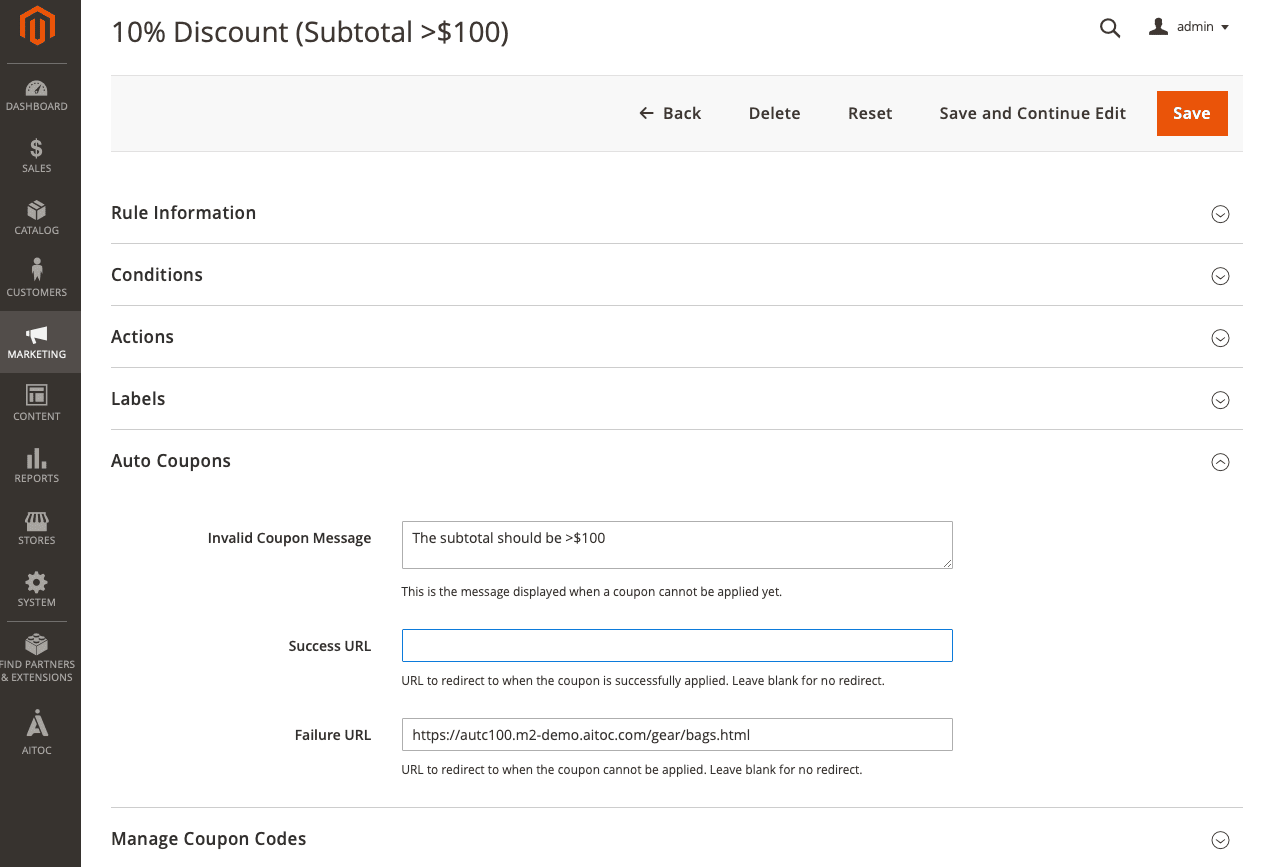
We have 3 options here: Invalid Coupon Message, Success URL, Failure URL.
Invalid Coupon Message
In the majority of use cases, customers visit a website without any items in their cart. Therefore, it is crucial to inform customers of the following:
-
a coupon code has already been used. This ensures that customers do not encounter any confusion or frustration when attempting to understand the rules of the promotion;
-
the possible reminder about the conditions the customer should meet in order to receive the discount;
-
customers may add products to their cart at their own pace. Once they meet the coupon conditions, the website will automatically inform them. Hence, customers need not enter the coupon code anywhere, making the shopping experience more streamlined and convenient.
It is essential for websites to effectively communicate these points to customers to ensure a positive shopping experience and to build a loyal customer base.
Therefore, we have the special Invalid Coupon Message note. The text on this field will appear on the frontend when the customer opens the URL from above yet the conditions are not met:
Success URL
When the customer uses the aforementioned link, the extension automatically adds the coupon code to the cart and checks whether the conditions of the cart rule are met. If it happens immediately, then the user gets redirected to the URL provided in the Success URL. If it's left blank, then the customer gets redirected to the homepage.
How it can be used?
Suppose you are running a marketing campaign to target customers who have abandoned their online shopping carts. Abandoned cart refers to an online shopping behaviour in which a customer adds items to their cart but leaves the website before completing the purchase. This behaviour causes a loss of sales and revenue for the online retailers, while for the customer, it means they are just one step away from finishing their purchase.
The marketing campaign may stimulate these customers by providing them a discount (e.g., 10% off for carts with a subtotal of over $100). The Success URL will redirect customers to a CMS page containing marketing information about this promotion.
If the customer with the abandoned cart clicks the link with the coupon, they will be directed to this page and will also also receive a notification that their discount has been applied to their cart.
Failure URL
When the customer uses the aforementioned link, the extension automatically adds the coupon code to the cart and checks whether the conditions of the cart rule are met. As previously stated, customers may often open this link without having any products in their cart, including those who are visiting your website for the first time. As a result, the conditions may not be met immediately, and users will be redirected to the URL specified in the Failure URL. If it's left blank, then the customer gets redirected to the homepage.
For instance, we have a marketing campaign to provide a 10% discount for purchases made in the Bags category with a subtotal of over $100. The guest customer opens the link with the coupon. The extension automatically adds the coupon code to the cart and checks whether the conditions of the cart rule are met. However, the conditions are not yet met, so the extension redirects the customer to the Bags category using the URL specified in the Failure URL field. The Bags category may already have some information about the promotion:
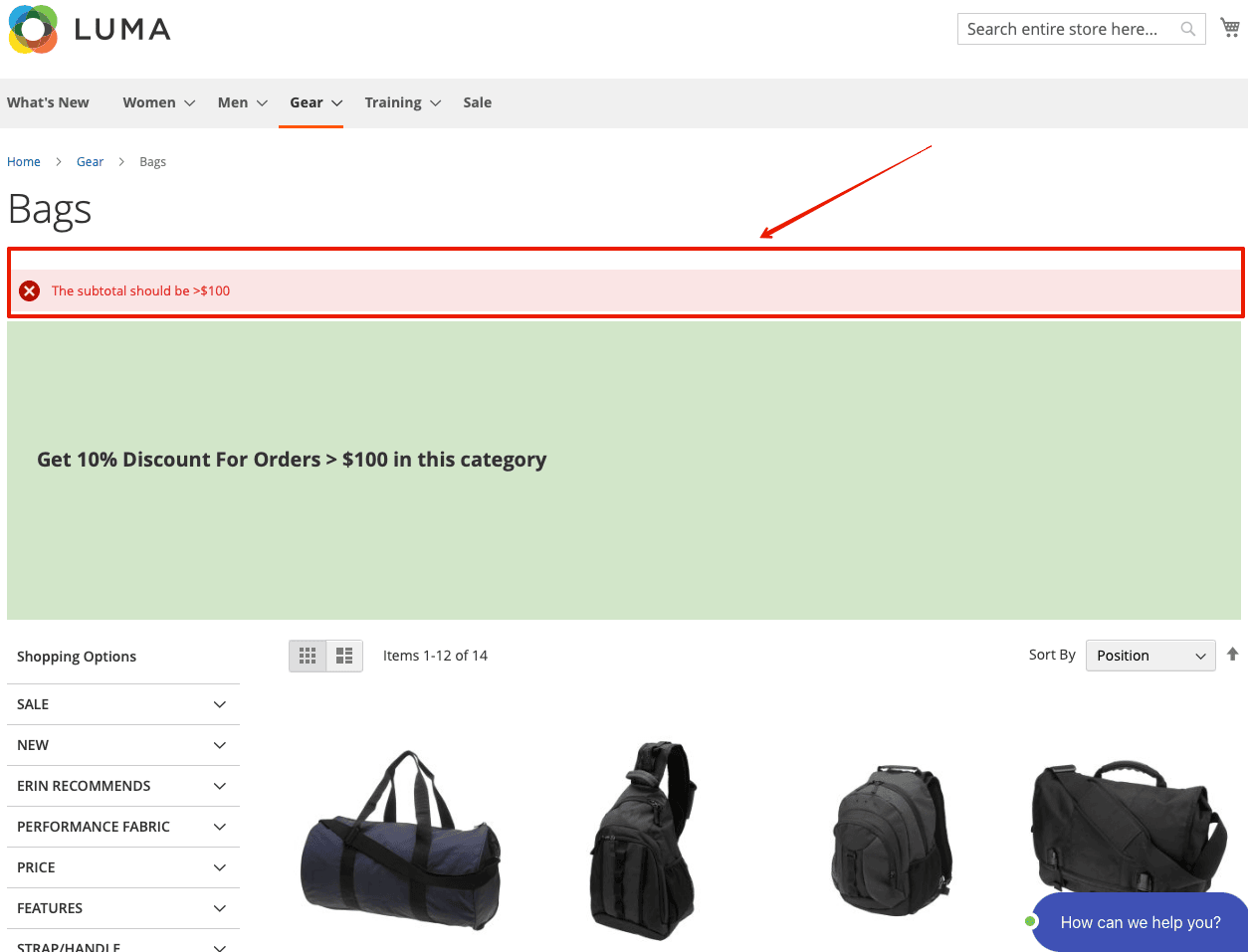
Note that the Invalid Coupon Message is also shown for the customer.
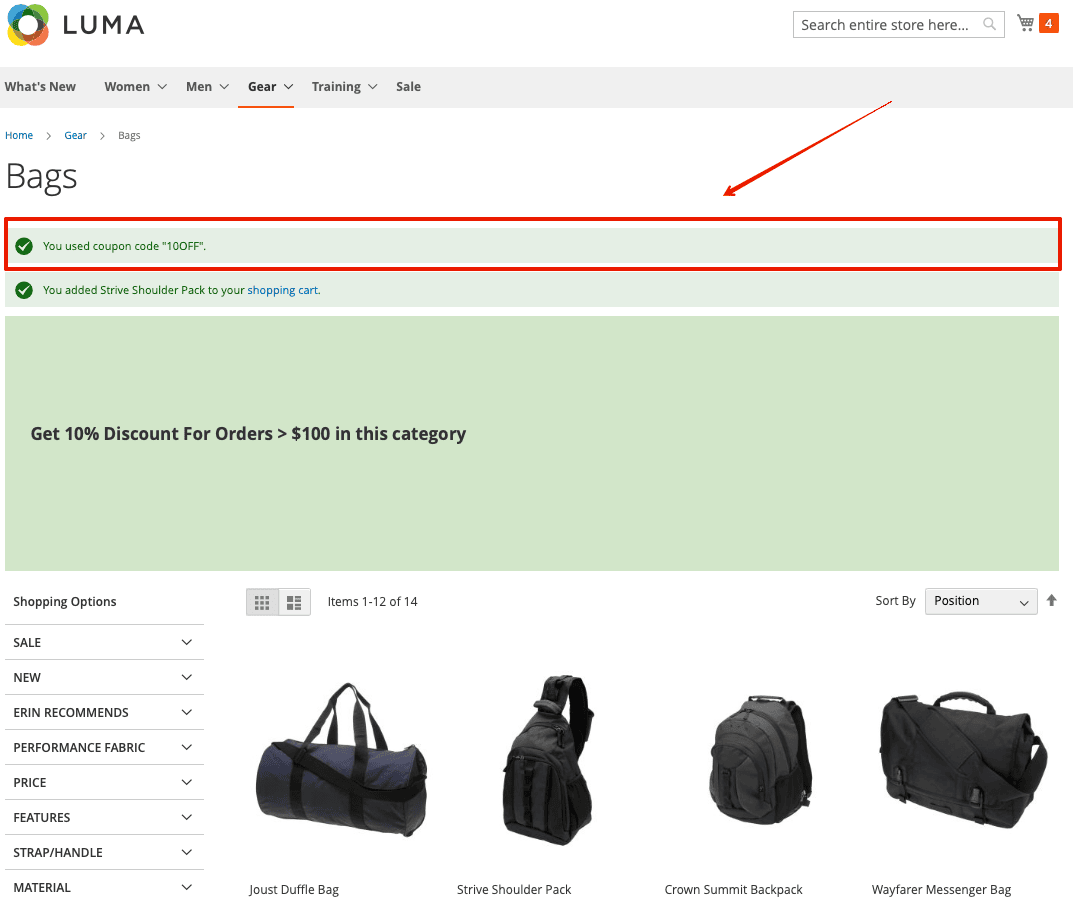
Whenever a customer adds products to the cart, the extension automatically checks whether the conditions of the cart price rules are met. If they are, the customer will receive a notification from the extension automatically:
THANK YOU FOR CHOOSING AITOC EXTENSIONS!