Pre-Orders for Magento 2

The Pre Orders for Magento 2 extension allows store owners to sell out-of-stock products as pre-ordered goods. This option benefits store owners as they can receive revenue in advance and estimate marketing demand before a product is released. It also helps convert new visitors into customers and allows customers to be notified about the status of a product and book upcoming products. Using this extension, you can charge customers for pre-order items or only notify them about availability.
- Allow pre-ordering products
- Place the Pre-Order button instead of Buy Now or Add to Cart
- Specify the time when items are expected to be available
- Notify customers by email when their pre-ordered products arrive
- Allow customers to make prepayment
- Provide the ability to return products to stock on schedule
- Improve your store order management and boost sales
- Filter orders with pre-order products using Pending/Processing Pre-Order status
Features
Pre Orders for Magento 2
The business environment is only sometimes stable, and store owners should be ready for quick changes. They should be able to predict customers’ needs. After all, their global goal is to make their e-commerce business work profitably and efficiently.
By applying Magento 2 backorder extension, you demonstrate your care about customers and gather valuable information on their preferences and desires.
Why the module is useful
With the help of the extension, you can sell out-of-stock products as pre-ordered goods. Customers can pre-order products they like in your Magento 2 store without extra effort. The Pre-Order option notifies buyers when their goods arrive.
Benefits for Store Owners
Receiving revenue in advance. By allowing customers to pre-order, retailers may get proceeds from sales even before a product enters the market. They actively use this revenue to cover expenses related to shipment or product launches.
Estimating marketing demand before the product release. Although it is not easy to predict customer expectations, the module lets get an idea of the potential demand in a new product. It also helps to estimate the required supply and optimize inventory and warehouse costs. It means you can maintain optimal inventory levels.
Converting new visitors to customers. Take advantage of potential customers and increase sales of unavailable products. Pre-order notifications will keep customers and make them wait for the products to return. Let your customers get Flagman products first.
Benefits for customers
Notifications about the product status. It will be rather useful for buyers to get to know the out-of-stock status of a product and understand that this item can be pre-ordered.
Booking upcoming products. This is a good way to satisfy customers as they can book new goods before they are in stock and available for delivery.
Advanced shopping experience. Customers may keep on checkout even with the products they like when they are out of stock. This indeed makes people feel more positive and satisfied.
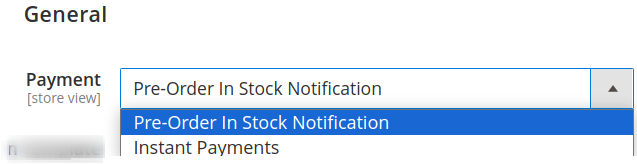
Decide pre-order products behaviour
Decide if customers can purchase the pre-order product or they can only subscribe for notification when the pre-order product is back in stock
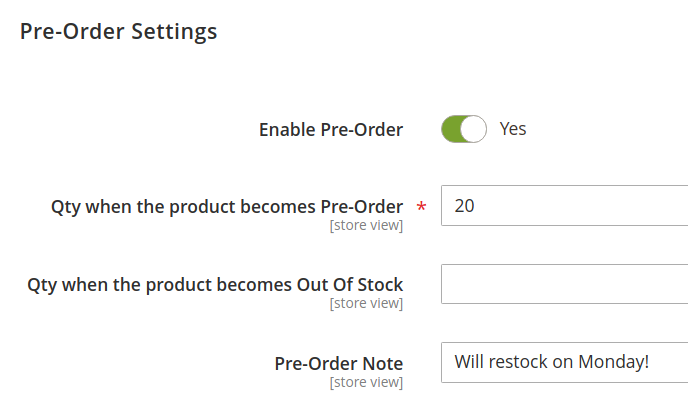
Configure and enable product for Pre-order
You can enable the product to be available as a pre-order. The module lets you define the stock quantity value for a product to become available for pre-order and out-of-stock.
You can also add a custom pre-order note that will appear on the front end.
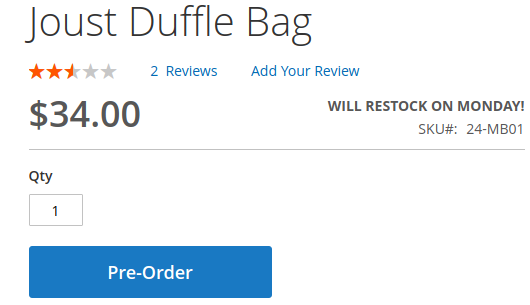
Purchase pre-order products
When the product becomes enabled for pre-order and the purchase option has been selected from the admin configuration, the "Add to Cart" button will be replaced by the "Pre-order" button.
The customers can click on the pre-order button and then process further to purchase the product.
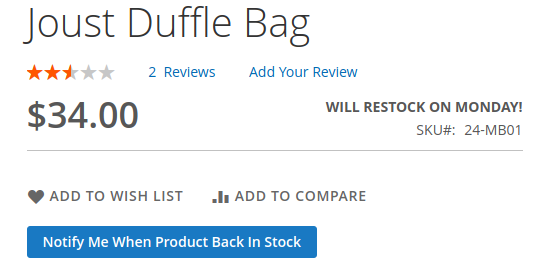
Subscribe for the product back-in-stock notification
Suppose Pre-Order In Stock Notification option is selected and pre-order functionality is enabled for a product on the front-end. In that case, the customer will see the button to enter their email address to receive an email notification once the product is back in stock.
Demo website
-
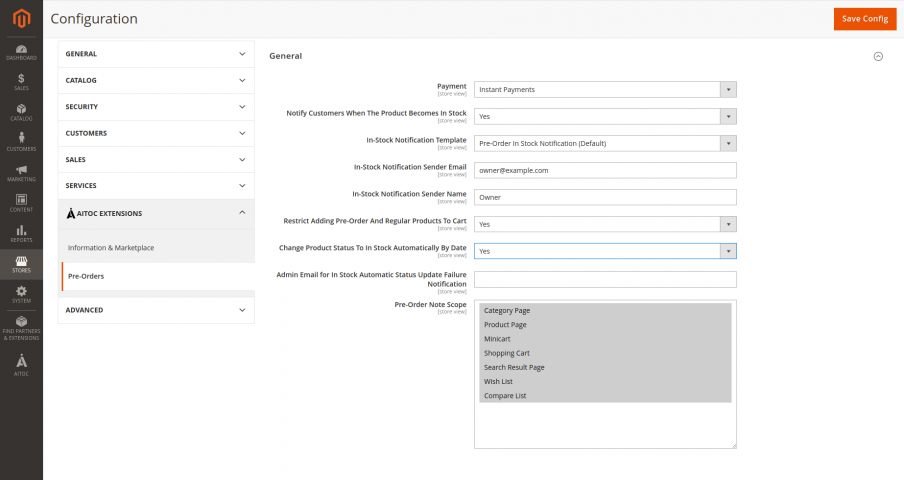
Module configuration
Module configuration
-
Product-specific setting
Enable and configure the product to accept pre-orders.
-
Front-end example
Example of Pre-order product