
Checkout Fields Manager for Magento 2

The Checkout Fields Manager for Magento 2 empowers store owners to customize the checkout experience by adding, editing, and managing extra fields at any checkout step. This module enables you to collect precise customer data tailored to your business needs — from delivery preferences to B2B account details — all without coding.
It’s ideal for businesses seeking a flexible checkout flow that captures the right information, enhances personalization, and improves order accuracy.
- Add custom fields to the checkout page in Magento 2.
- Pick the input type that works for you: Text Field, Text Area, Date, Yes/No, Multiple Select, Dropdown, Checkbox, Radio Button.
- Display the custom fields at different places on the checkout
- Make your custom fields required, if you wish.
- Show extra fields in specific Store Views (per Website).
- Show the information from custom fields in Order details (both for the customer and the admin).
- Export data from custom fields in the Orders grid to .csv or .xls - along with standard Magento Order export.
Features
What the Checkout Fields Manager Does
The Magento 2 Checkout Fields Manager lets you customize and extend your checkout form by adding, editing, and managing custom fields at any step of the process. It turns your checkout into a flexible data collection tool that aligns perfectly with your business needs.
Why the Module Is Useful
Custom checkout fields help merchants collect accurate, first-hand customer data without extra effort or cost. With this reliable information, businesses can make smarter decisions in marketing, pricing, and shipping strategies.
By tailoring the checkout flow and marking only essential fields as required, the extension also ensures a faster, more convenient checkout—boosting completion rates and customer satisfaction.
How module works
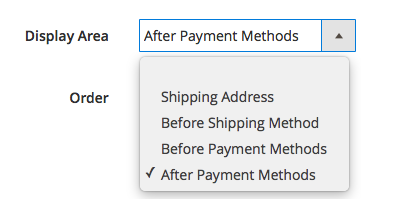
Flexible Checkout Field Placement
The module allows you to configure where custom fields appear during checkout. You can display fields before or after the Shipping Address, before the Shipping Method, or before or after the Payment Method. Simply select the preferred position to ensure your custom fields appear exactly where they’re most relevant in the checkout flow.
Frontend Display and Validation Control
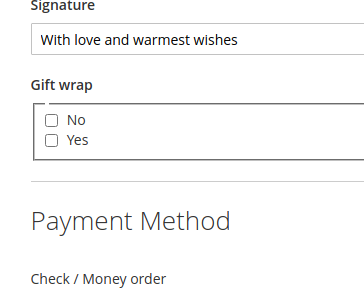
The custom fields you create appear on the storefront checkout at the selected display area — such as before or after the shipping or payment sections. If a field is set as mandatory, customers cannot place their order until it’s completed.
Additionally, you can apply validation rules to each field to ensure accurate data entry and prevent spam or fake submissions, maintaining clean and reliable customer information.
Order Data Integration
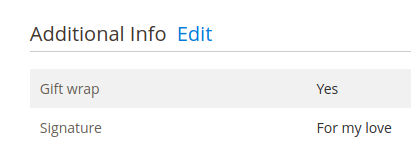
When customers fill in or select values for the custom fields, the information is stored with the order and displayed under the “Additional Info” section in both the Admin Order View and the Customer Account Order Details page. When exporting the order data, the custom field values will be part of it.
Demo website
-
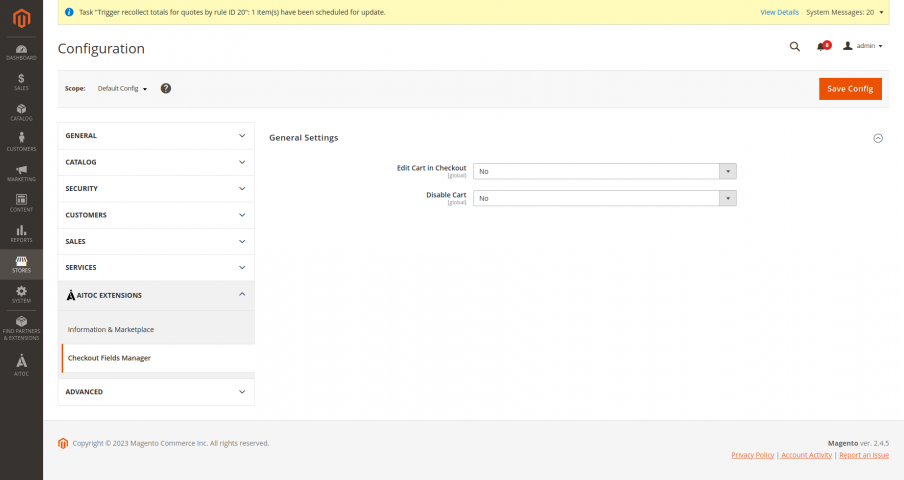
Module Configuration
Module Configuration
-
Checkout fields grid
Checkout fields grid
-
Create new Checkout Field
New Checkout Field
-
Order info for admin
Order info for admin
-
Customer View
Customer View
Changelog
1.0.13 - September 19th 2025
+Added compatibility for Magento 2.4.8 and PHP 8.4 (CFM-56)
1.0.12 - October 28th 2024
*Fixed error when creating checkout attribute in Magento 2.4.6 (CFM-42)
*Fixed issue with editing checkout field attribute values from admin order (CFM-44)
*Fixed issue with validation when editing checkout field attribute values from admin order (CFM-45)
*Resolved issue with missing checkout attribute values in transactional emails (CFM-51)
*Fixed issue with setting the default value for multi-select and drop-down type checkout attribute (CFM-51)
1.0.11 - September 28th 2022
*Fixed issue from moving to payment step from shipping step on checkout when custom fields are available on checkout payment method step
1.0.10 - September 1st 2022
+Added Magento 2.4.4 compatibility
+Added PHP 8.1 compatibility
*Fixed error when running setup:upgrade command on Magento 2.3.x
*Fixed issue with editing checkout field marked as hidden
1.0.9 - April 7th 2022
+Created custom checkout attribute value will now appear in the email.
*Fixed compilation error for Magento 2.3
*Fixed issue with "Edit Cart in Checkout = Yes" functionality
*Fixed issue with editing Additional Information on admin order detail page
1.0.8 - November 24th 2021
*Fixed error "Area code is not set" when running setup:upgrade
*Fixed issue with missing information in order success email template
*Fixed issue with editing Additional Information section on order detail page in admin
*Fixed issue with editing cart on checkout page functionality
1.0.7 - August 7th 2021
+Added compatibility with Magento 2.4
+Added compatibility with PHP 7.4
*Fixed a bug which affected ability to view orders at the front-end and admin panel
1.0.6 - March 24th 2020
*Fixed issue with disappeared checkout fields after unchecking field value
1.0.5 - December 9th 2019
+Improved attribute creation process for Magento 2.3+
1.0.4 - April 9th 2018
+CFM main grid improved.
*Fixed - some magento installations has an error in admin area during invoice or ship
*Fixed - SOAP API error
*Fixed - customer address on the checkout has incorrect view when used composite form fields
*Fixed - view order error
*Fixed - M2.2 Compilation issue
*Fixed - attribute view CE 2.1.9
*Fixed - default labels on Checkbox front-end wasn't shown
*Fixed - unused option 'System' in Checkout Attributes grid
*Fixed - errors during switching-off extension
*Fixed - value validation for checkout fields
*Fixed - extra checkout information is not visible in customer's "My orders"
*Fixed - extra checkout information is not visible in order details for admin
*Fixed - XSS vulnerability
*Fixed - setup:upgrade CE 2.1.9